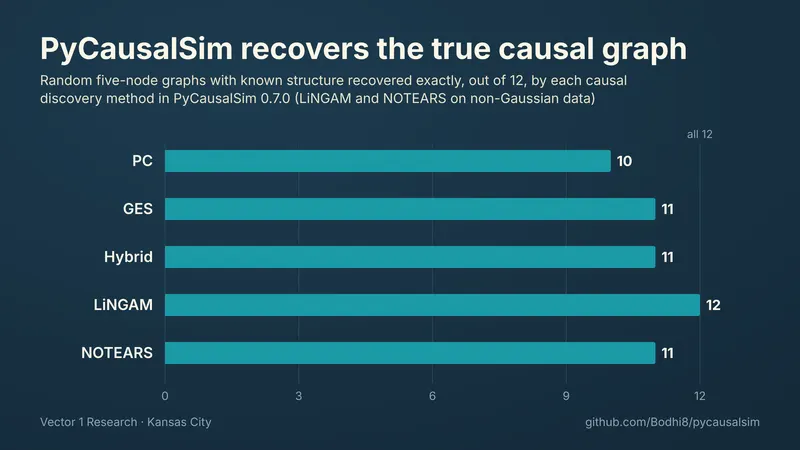
Built in Kansas City: An AI Agent for Your Marketing Model That You Can Talk To, Give Feedback and Update
Papilon Studio and the PyCausalSim demo now answer questions in plain English, take your corrections and change the model only when you approve. Every number in an answer traces to the calculation behind it, and it runs free in your browser.

An answer is only as good as where its numbers came from
Ask an AI analytics assistant what your best marketing channel returns and you get a fluent sentence with a number in it. Whether that number came from your model, from the assistant's own arithmetic or from nowhere is usually left to trust. When the sentence decides where next quarter's budget goes, that trust is the weakest part of the analysis.
This week I added a chat and agent layer to the two open-source frameworks I build at Vector 1 Research in Kansas City: Papilon, a Bayesian marketing mix model, and PyCausalSim, a causal inference library. You can try it in two demos that already run the frameworks in your browser, Papilon Studio and the PyCausalSim demo. Both now have an "Ask the model" panel. It costs nothing, needs no account or API key, and by default nothing you load leaves your computer.
The design follows one rule: the model supplies every number and every caution, and the agent only chooses what to ask the model and writes the sentences. Then a check reads the finished answer and traces every number in it to the calculation it came from. This article shows how that works, what the agent says about a brand whose true returns are known, how you correct it, and where it falls short.
How the agent works
Each framework exposes its methods as tools with JSON schemas. Papilon has ten, including returns by channel, the budget optimizer, plan stability, the value of a lift test on each channel, a forecast and a backtest. PyCausalSim has nine, including the causal graph, an intervention ("what if"), the naive correlation for comparison, a ranking of drivers, a sensitivity analysis and policy optimization. Every tool result carries the cautions that apply to it, decided by fixed rules rather than by prose: a range wider than its estimate, a plan that spends beyond anything in the data, an interval that includes zero.
When you ask a question, the agent makes a short plan of tool calls, runs them on the fitted model one at a time, and writes the answer from what they return. Later calls can use earlier results: the quarterly plan forecasts the next 13 weeks under the spend the optimizer just chose. In the demos each call appears on screen as it runs, with a small table of its result and the raw output a click away.
The agent built into the libraries uses no language model. It is a deterministic planner that recognizes a fixed range of questions and writes its answers from templates filled with tool results, so the same question always gets the same answer. Any chat model with tool calling can drive the same tools instead, which I come back to below.
In Python it takes three lines once a model is fitted:
import papilon as pp
from papilon.ai import ToolBox
from papilon.chat import Chat

df, truth = pp.make_synthetic_mmm()          # 156 weeks, four channels, known true returns
model = pp.MMM(df, "sales", ["paid_search", "paid_social", "online_video", "display"], "date",
               controls=["price_index", "promo"], delayed=["online_video"], seed=11).fit()

chat = Chat(ToolBox(model))                  # the built-in agent: no key, no network
reply = chat.run_task("plan_quarter")
print([s["tool"] for s in reply.steps])
g = reply.grounding
print(g["checked"], "numbers checked,", len(g["unsupported"]), "untraced")
['brief', 'optimize_budget', 'plan_stability', 'value_of_lift_test', 'forecast']
54 numbers checked, 0 untracedreply.text holds the answer, reply.steps every tool call with its input and result, and reply.grounding the check.
The grounding check
The check pulls every number out of the answer and looks for it among the numbers in that turn's tool results, tool inputs and the question. A number counts as traced when some value rounds to it at the precision written, either as it is or times 100, because a share of 0.095 is usually written as 9.5%. For a number x written with d decimal places, it is traced when some source value v satisfies
Signs are ignored so that a cut written as "cut 12.3" still matches a change of −12.3. Integers up to 12, interval levels like "90%" and years are not checked, since they are labels rather than findings.
Here is the check on a sentence with one number that no tool produced:
from papilon.chat import check_grounding

sources = [("get_roi", {"channel": "online_video", "roas_mean": 1.7531, "share_of_sales": 0.0951})]
answer = "Online video returns 1.75, or 9.5% of sales. Doubling its spend would add about 3.51."
g = check_grounding(answer, sources)
print([(x["text"], x["source"]) for x in g["supported"]])
print([x["text"] for x in g["unsupported"]])
[('1.75', 'get_roi'), ('9.5%', 'get_roi')]
['3.51']1.75 is 1.7531 rounded, and 9.5% is 0.0951 times 100 with |9.51 − 9.5| = 0.01, inside the 0.05 allowed for one decimal place. The 3.51 is flagged even though it is exactly 2 × 1.7531 rounded, and that is the point: nothing computed it, and doubling spend does not double sales once a channel saturates. A number the model did not produce needs a tool that produces it. In the demos, traced numbers are underlined in green with the tool's name on hover, untraced ones in red, and the line under each answer says how many were checked.
What it says about a brand with a known answer
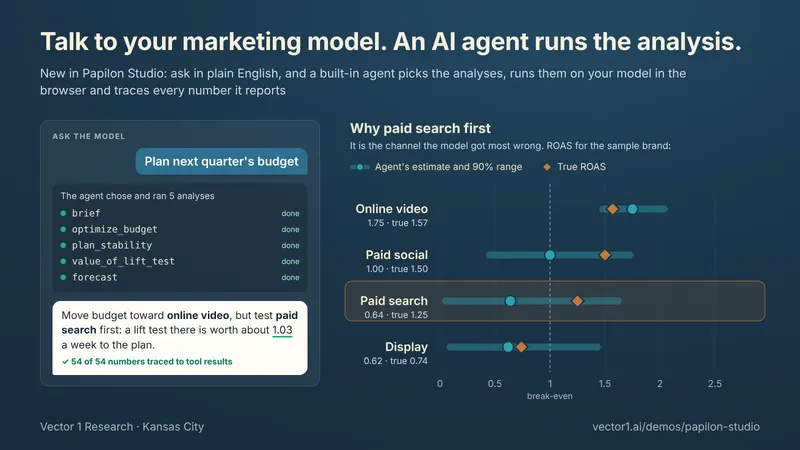
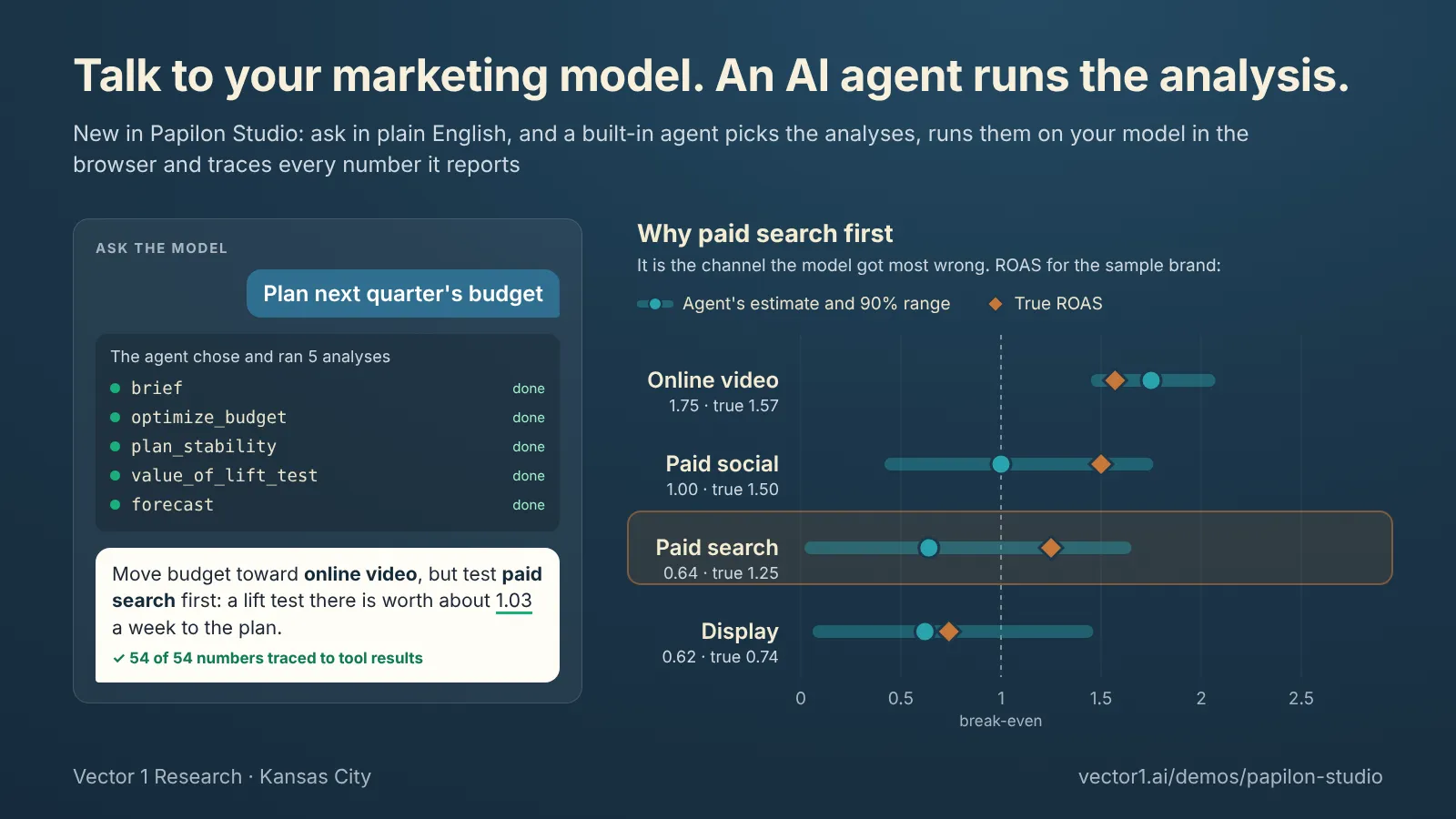
Papilon Studio has a "Try the sample brand" button: 156 weeks of sales and spend on paid search, paid social, online video and display, simulated from returns I wrote down, so the right answers are known. Fit the model (a few seconds in the browser) and ask "Which channel returns the most?". The agent calls get_roi and answers with every channel's return, its 90% range and the cautions. All 26 numbers in that answer trace. Here they are next to the truth:
| Channel | Agent's ROAS | 90% range | True ROAS |
|---|---|---|---|
| Online video | 1.75 | 1.48 to 2.04 | 1.57 |
| Paid social | 1.00 | 0.45 to 1.73 | 1.50 |
| Paid search | 0.64 | 0.05 to 1.62 | 1.25 |
| Display | 0.62 | 0.09 to 1.43 | 0.74 |
These are the browser figures. The Python run above fits the same data with the library's default settings, so its figures can differ slightly from Studio's.
The agent task "plan next quarter" chains five tools into one report: an overview of the fit, a budget plan, a stability check on that plan, the value of a lift test on each channel, and a 13-week forecast under the new mix. Keeping today's total of 149.2 a week (the sample is in thousands of dollars) and moving no channel more than 50%, it raises online video from 47.2 to 70.4 and trims the other three: paid search from 30.3 to 20.7, paid social from 49.2 to 44.8 and display from 22.4 to 13.2. The expected gain is 11.1 a week, with a 90% range of 2.9 to 18.1, and the plan beats today's mix in 99% of the model's posterior draws. Rebuilt on separate halves of those draws, every move points the same way. All 54 numbers in the report trace.
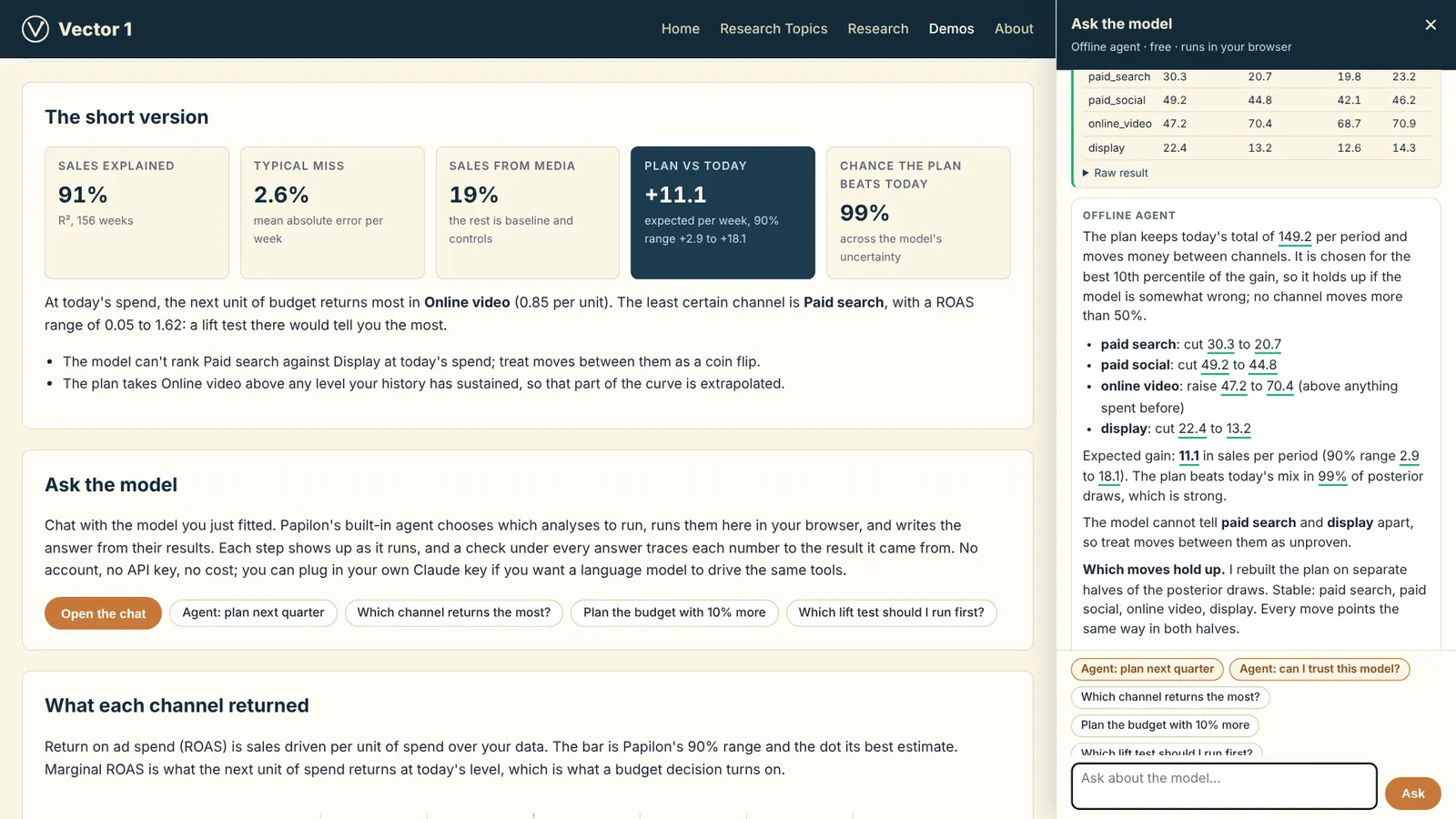
The part of the report I care about most is what it says not to trust. It flags that 70.4 a week on online video is above anything the brand has spent, so that end of the curve is extrapolated. It says the model cannot tell paid search and display apart, so moves between them are unproven. And it says to run a lift test on paid search first: a test that pins its return to within 0.25 is worth about 1.03 a week to the plan and would narrow its range from a width of 1.57 to about 0.64.
That last flag earns its place. Paid search is the channel the model got most wrong: its true return is 1.25, about double the 0.64 estimate, and the plan cuts it. The range contains the truth and the point estimate does not. An assistant that reported "paid search returns 0.64" would have sent the budget the wrong way with a straight face. This one reports the range, says the cut rests on the least certain number in the model, and names the test that would settle it.
Asking a causal model what-if questions
The PyCausalSim demo simulates 800 website visitors in which high-intent traffic converts better and also gets heavier, slower pages, so a straight comparison understates what faster pages are worth. Ask "What if we cut page load time by 1 second?" and the agent calls two tools. The causal estimate, a backdoor adjustment for traffic source and device, says conversion rises 3.07 percentage points. The true effect in the simulation is 3.0, inside the 95% interval (the interval comes from a bootstrap, so it shifts slightly from run to run). The naive correlation, a straight line through the raw data, says 2.09, which understates the payoff by about a third.
The agent task "is the effect real?" adds a stress test. Its robustness value is 0.37: a hidden common cause would have to explain 37% of the leftover variation in both load time and conversion to erase the effect. A placebo test that shuffles load times finds no false signal, adding an unrelated variable leaves the estimate where it was, and half-samples agree on its sign. The second agent task, "what should we act on first?", ranks the drivers, stress-tests the top one and searches for the best settings, and it notes that the search weighs conversion alone, ignoring costs such as revenue lost to a lower price.
Giving it feedback and updating the model
A model is only as right as its assumptions, and you often know things the data cannot show. In the PyCausalSim demo you can tell the agent: "Assume device type causes page load time." It does not change anything yet. It proposes the change in plain words, "add device type → page load time", and waits for you to approve or decline. Approve, and the causal graph on the page redraws and every later estimate uses it. Decline, and it leaves the graph alone and answers without the change. "Device type does not cause page load time" proposes removing the link the same way.
In the libraries, any tool that changes the model is listed as one, and the chat stops before running it:
import numpy as np
import pandas as pd
from pycausalsim import CausalSimulator
from pycausalsim.ai import ToolBox
from pycausalsim.chat import Chat

rng = np.random.default_rng(42)                  # the demo's simulated visitors
n = 800
traffic = rng.choice([0, 1], n, p=[0.6, 0.4])    # high-intent traffic...
load = 3.0 + 0.5 * traffic + rng.exponential(0.5, n)   # ...gets slower pages
price = 20 + rng.normal(0, 5, n)
device = rng.choice([0, 1, 2], n)
conv = 15 - 3.0 * load + 2.0 * traffic - 0.5 * (price - 20) + rng.normal(0, 2, n)
df = pd.DataFrame({"traffic_source": traffic, "page_load_time": load, "price": price,
                   "device_type": device, "conversion_rate": conv})

sim = CausalSimulator(df, "conversion_rate", treatment_vars=["page_load_time", "price"],
                      confounders=["traffic_source", "device_type"], random_state=0)
sim.discover_graph()
chat = Chat(ToolBox(sim))

reply = chat.ask("Assume device type causes page load time")
print(reply.pending["summary"])                  # nothing has changed yet
reply = chat.approve()                           # or chat.decline()
print(sim.graph["page_load_time"])
add device_type -> page_load_time
['traffic_source', 'device_type']Pass confirm= to decide in code instead, for example to log every change for review. In Papilon Studio you update the marketing mix model itself from the dashboard: mark the channels whose effect peaks a week or more after they run, add price or promotion controls, change the budget and refit. The chat then starts fresh on the new fit.
Bring your own language model
The built-in agent covers returns, budget plans, what-if spend, lift tests, forecasts, causal effects, drivers and graph changes. For open-ended questions, connect a language model. In the demos, open "Optional: use Claude with your own API key", pick a model and paste a key. The key stays in the browser tab and goes only to Anthropic, which bills your account; your questions and the tool results go there too, but the data file does not. Claude then calls the same tools on the model in your browser, changes to the graph still wait for your approval, and the same check runs on its answers, so a figure it works out for itself shows up in red.
In Python the same chat takes any backend, with requests made through the standard library:
Chat(ToolBox(model), llm="anthropic")              # ANTHROPIC_API_KEY
Chat(ToolBox(model), llm="openai:<model>")         # any chat completions API with tool calling
Chat(ToolBox(model), llm="ollama:llama3.1")        # a local model; nothing leaves the machine
python -m papilon.chat and python -m pycausalsim.chat start the same conversation in a terminal on your own CSV, and PyCausalSim now has an MCP server to match Papilon's, for assistants that speak the Model Context Protocol.
Where it breaks
The grounding check verifies numbers, not reasoning. A traced number can still be put in the wrong sentence, such as one channel's return quoted for another, and a made-up number can pass by coinciding with an unrelated value in a long result. Read the steps behind any answer you act on; they are one click away for that reason.
The built-in agent understands only what it was written to understand. Ask it something outside its range and it says so, lists what it can do and gives the model overview instead of guessing.
Everything rests on the models' assumptions. Papilon's ranges are honest about what the data can pin down, and that is why the agent's best advice on the sample brand is to run a test. PyCausalSim's estimates assume the causal graph has no hidden common causes, which is exactly the assumption the sensitivity check measures and the graph-change approval lets you revisit.
The chat features are on GitHub now and will reach PyPI with the next releases of both libraries, so install from GitHub for now.
Five questions to ask any AI analytics assistant
- Can I see every calculation it ran to answer me?
- Does each number in the answer trace to one of those calculations?
- Does it give ranges and cautions, or only point estimates?
- Does it ask before it changes the model or the data?
- Where does my data go when I ask?
Built in Kansas City, free and open source
Papilon and PyCausalSim are built at Vector 1 Research in Kansas City and released under the Apache 2.0 license. The chat module is shared line for line between the two libraries, and the agents are documented in Papilon's guide to AI assistants. How the underlying models hold up against known answers is in Marketing Mix Modeling You Can Check and Causal Discovery You Can Check, and getting your own data into Studio is covered in Try a Free Marketing Mix Model on Your Own Data.
Open Papilon Studio, press "Try the sample brand", fit the model and ask it what to do next quarter. Then ask the PyCausalSim demo what a faster page is worth.
Sources
- Papilon, github.com/Bodhi8/papilon, with the chat layer in
papilon/chat.pyand the tools inpapilon/ai.py - PyCausalSim, github.com/Bodhi8/pycausalsim, with the tools in
pycausalsim/ai.py - Vector 1, Papilon Studio and the PyCausalSim demo; the demo figures above are from runs of both on Nov 19, 2026, and the true values from the simulations that generated their data