Learn AI for Free: A 30-Day Plan for Working Professionals
Forty-five minutes a day for 30 days, using free training from the companies that build AI, ending with one task you do measurably faster.

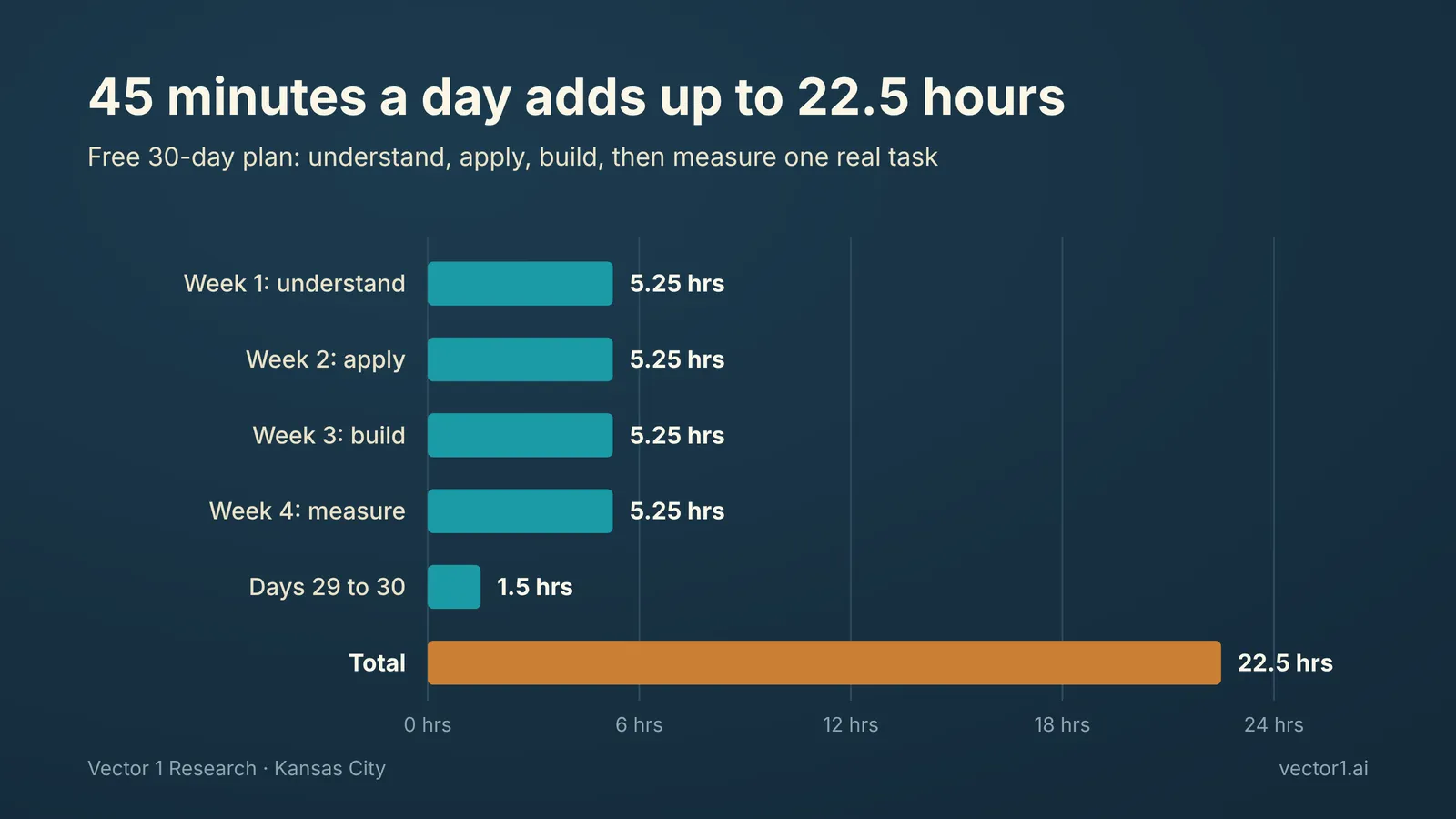
You can learn to use AI well at work in 30 days without paying for a course. The plan below takes 45 minutes a day, about 22.5 hours in total, and ends with a before-and-after measurement on one real task. That measurement matters more than any certificate, because it shows what the skill is worth.
The budget
| Week | Focus | Minutes a day | Hours |
|---|---|---|---|
| 1 | What these systems are and where they fail | 45 | 5.25 |
| 2 | Using AI on your own work | 45 | 5.25 |
| 3 | Building something small | 45 | 5.25 |
| 4 | One project, measured | 45 | 5.25 |
| Days 29 and 30 | Write up the result | 45 | 1.5 |
Seven days times 45 minutes is 5.25 hours a week. Four weeks plus two days comes to 22.5 hours.
Week 1: understand before you apply
Start with how these systems work and where they go wrong, so you know when to check their output.
- Anthropic's AI Fluency: Framework & Foundations covers how to think about working with AI. It is one of 22 courses on Anthropic's course site.
- OpenAI Academy has an Apply AI at Work track and recorded livestreams. Its FAQ says enrollment is free.
By day 7, write down three tasks from your own job where AI might help and one where it clearly should not be trusted.
Week 2: apply it to your own work
Work through the at-work material from OpenAI Academy or Anthropic's Claude 101, then use one tool every day on a task from your list.
If you want a Google credential, Google AI Essentials takes under 5 hours and costs $49 a month in the US after a 7-day free trial. Five hours fits inside the trial week, so you can finish it without paying, as long as you cancel before the trial ends.
Week 3: build something small
Building one small thing teaches more than another week of reading. Two routes:
- No code: set up a reusable prompt or project for a task you repeat weekly, with your instructions, examples and a checklist for reviewing the output.
- Some code: Anthropic's Building with the Claude API and Introduction to Model Context Protocol courses walk through connecting a model to your own data and tools.
If your work involves marketing data, Papilon Studio runs a marketing mix model in the browser and lets you question the results in plain English, at no cost.
Week 4: one project, measured
Pick the task from week 1 that you do most often. Time it the usual way once. Then do it with your AI workflow and time it again.
A worked example: a weekly status report takes 90 minutes. With a prompt that drafts it from your notes, plus 15 minutes of checking, it takes 40. That saves 50 minutes a week. Over 52 weeks it comes to 2,600 minutes, about 43 hours a year.
Record what you checked and what you had to fix. An honest note on the errors makes the result believable to a manager.
Days 29 and 30: write it up
One page: the task, the before and after times, what the AI got wrong, and how you caught it. That page is your proof of skill, and it is the kind of evidence a hiring manager or your own boss can act on.
Where to go next
If you are in Kansas City and want a classroom or a degree, see Learn AI in Kansas City for the local options.